 Super Notch
Find and resume your AI coding sessions.
Super Notch puts your Claude Code, Codex, and Cursor sessions in your Mac’s notch. Hold one key to dictate into any text field. Hold another to ask a question out loud.
One payment. $20 for your first Mac. $10 per additional Mac.

Your sessions, in one place.
Claude Code, Codex, Cursor, OpenCode, and T3 Code sessions show up as cards in the notch. Click one to go back to that agent.
-
Know which one it is.
Each card carries the project name and the last few lines of the conversation.
-
See your limits.
Claude, Codex, Cursor, and Grok usage sits beside the cards, with your Mac’s CPU, memory, and disk in the footer.
-
Know who is still working.
Each working session gets an orbiting sphere in the notch.
Say it. Super Notch types it.
Hold Right Option in any text field and speak. Your speech becomes text on your Mac, with fillers like um and uh dropped.
- In Messages, Type heard “Uh on my way exclamation point see you soon.” and typed “on my way exclamation point see you soon.”
- In Mail, Type heard “Um the the BB budget looks good and I can sign off today.” and typed “the the BB budget looks good and I can sign off today.”
- In Slack, Type heard “Um, can you review the pricing page before lunch question mark?” and typed “can you review the pricing page before lunch question mark?”
- In Cursor, Type heard “A deploy the super base edge function, then push to GitHub.” and typed “A deploy the super base edge function, then push to GitHub.”
- In Notes, Type heard “Groceries number one oat milk number, two coffee number three eggs.” and typed “Groceries number one oat milk number, two coffee number three eggs.”
- In Reminders, Type heard “Half and half, um two dozen eggs and bananas.” and typed “Half and half, two dozen eggs and bananas.”
-
Runs on your Mac.
Phonon 2, the speech model, is a 164 MB download plus its runtime. After that your speech is transcribed on-device.
-
Types what you say.
Drops fillers like um and uh. The rest is typed as heard. English only.
-
No monthly fee.
Dictation is part of the one-time license and uses no AI tokens.
Ask out loud. Stay where you are.
Hold Right Command and ask. The answer comes back in the notch, or in a floating HUD that can read the page under it.

-
Ask about what’s in front of you.
Move the HUD over a window and ask. Here it is explaining an arXiv paper in Safari. What it can read depends on the app and your permissions.
-
Pick the brain.
Answers come from Apple Intelligence on supported Macs by default, or from your own Grok or OpenAI account.
-
Give it a face.
Limone and Kai are the two built-in 3D avatars. You can also import your own VRM, or switch to the round mascot.
Limone by Harunagi. Kai by yomox9.
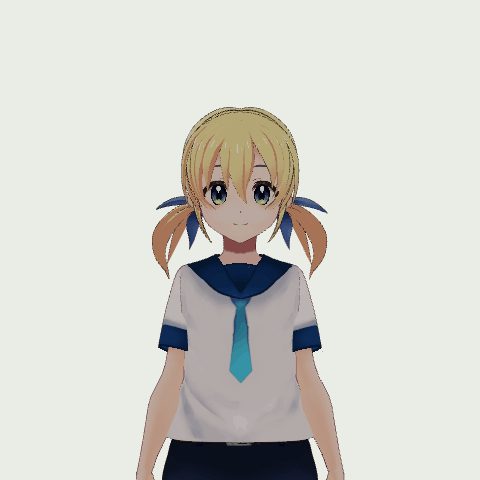
Limone 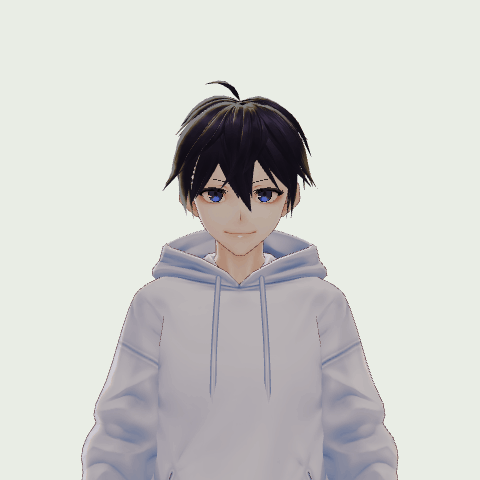
Kai Mascot


Works where you already work.
- Cursor
- VS Code
- Claude Desktop
- Codex app
- Terminal
- tmux
- cmux
- Claude Code
- Codex CLI
- Grok
- OpenGrok
- Hermes
- Pi
- OpenCode
- T3 Code
Your notch. Put to work.
One-time license.
Not a subscription.
$20 for your first Mac. $10 for each additional Mac. Super Notch supercharges the stack you already pay for.
Super Notch is free until Nov 30 at 11:59 PM PT or until all 50 free copies are claimed, with the BETA50 code applied automatically at checkout.
Buy and activate.
$10 for each additional Mac. USD. Apple silicon · macOS 14+.
Version 0.3.18 · signed and notarized.
Best with your Grok or OpenAI subscription. Type dictation uses no model tokens.
Pay here. Get a license key and a notarized download. Paste the key in Super Notch to activate this Mac.
Checkout with Stripe 14-day no-questions refund
- 14-day refundno questions asked
- Signed & notarized by Apple
- Checkout with Stripe
- Native SwiftApple silicon, macOS 14+
- Dictation runs on your MacPhonon 2
- One paymentno subscription
Does this replace Claude, Cursor, or Codex?
No. Keep the tools you already use. Super Notch finds and resumes sessions across them.
Is Super Notch a monthly subscription?
No. $20 for your first Mac, $10 for each extra. One-time.
Does dictation use tokens?
Phonon 2, Parakeet, and the Whisper downloads do not call Grok or OpenAI, so they spend no model tokens. OpenAI gpt-4o-transcribe uses your API key. macOS Speech permits cloud recognition. Talk and Chat answers do use your chosen brain.
What does my Mac need?
An Apple silicon Mac running macOS 14 or newer. Voice features need microphone and accessibility permissions. For the best answers, sign Super Notch into Grok or OpenAI in Settings. Apple Intelligence can answer on supported Macs if you want to stay on-device.
What is a Mac notch AI session manager?
Super Notch is an AI agent session manager for Mac. It finds and resumes Claude Code, Codex, and Cursor sessions from the MacBook notch, with Talk from the notch and Type dictation into the focused field. It does not replace those coding tools.
Is Super Notch a MacBook notch AI assistant?
Super Notch is a MacBook notch AI assistant: Talk from the notch, Type into the focused field, session cards, and a floating HUD. It runs on Apple silicon Macs, including MacBook Pro, on macOS 14 or newer. Cursor, Claude Code, and the rest stay the tools that write. Super Notch sits beside the agent.
Is Super Notch a Mac notch AI companion?
Yes. Super Notch is a Mac notch AI companion. It lives in the notch and a floating HUD beside the agent you already run. Sessions, Talk, and Type sit next to Cursor, Claude Code, and Codex. Super Notch does not replace those tools.
Is Super Notch a MacBook Pro notch voice assistant?
Talk is the MacBook Pro notch voice assistant path. Hold Right Command, speak, and the answer uses Grok, OpenAI, or Apple Intelligence on a supported Mac. You need Apple silicon and macOS 14 or newer. Talk is the notch conversation, not a coding agent.
Can I dictate into Cursor or Claude Code?
Yes. Focus that tool's field, hold Right Option, and Type writes the words there. You review and send. The default engine, Phonon 2, is local speech-to-text and spends no model tokens. Talk (Right Command) is the notch conversation, not a replacement for those tools.
Dictate into Cursor on Mac. Dictate into Claude Code on Mac.