YOUR WORK. RIGHT IN THE NOTCH.

Find and resume your AI coding sessions.

Supercharge the stack you already pay for.

Claude Code, Codex, and Cursor, together in one view. Pick a session from your Mac’s notch and get back to work.

One payment. $20 for your first Mac. $10 per additional Mac.

Apple silicon · macOS 14+ · Local dictation included
SUPER NOTCH / ACTUAL APP RECORDING

01Recognize the project.Not another mystery window.

02Pick up the thread.Return to your existing agent.

03Take help with you.In the notch or in a floating HUD.

A real app recording, from session card to agent window. Demo content is recorded. Your sessions stay in your tools.

KEEP THE TOOLS YOU ALREADY USE CursorClaudeCodexGrokOpenCode

01 / Sessions as context

Your projects.
Ready to continue.

Find the conversation you last worked on. Session cards keep the project, recent activity, and a way back to your agent together.

YOUR WORK, WITH ITS CONTEXT Actual app capture
A closer look at the notch

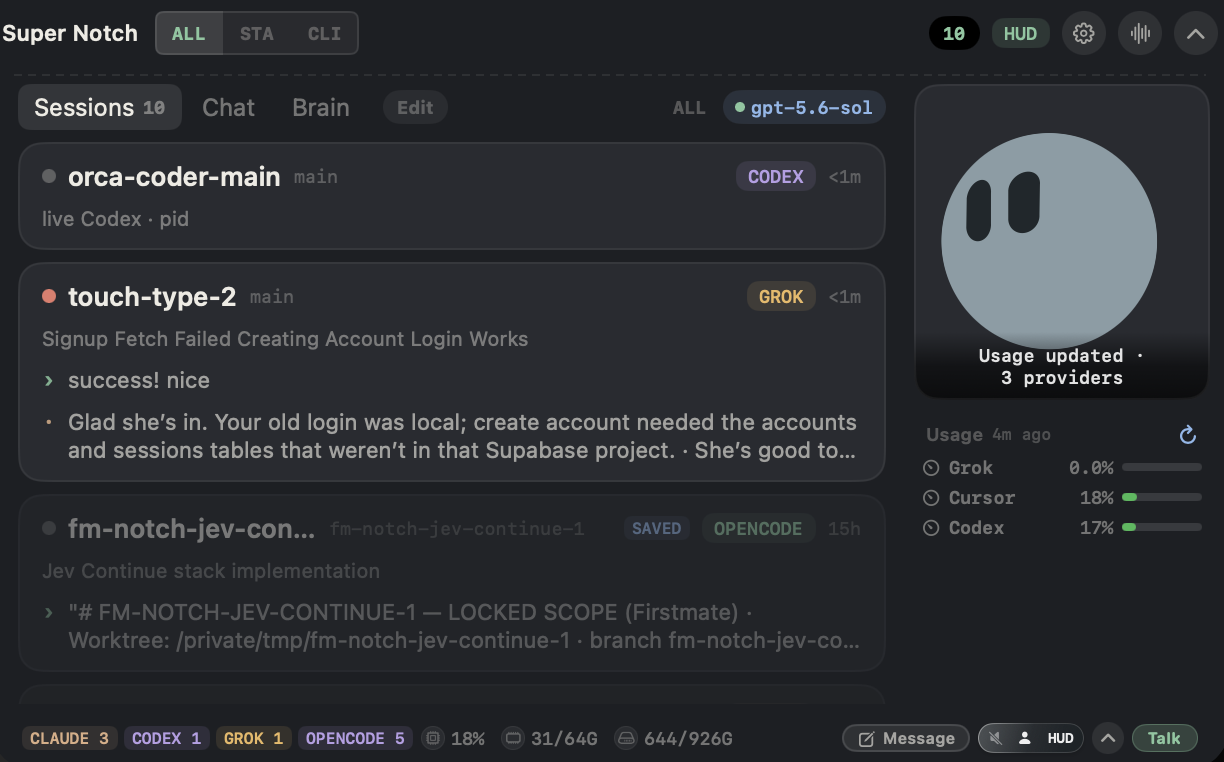
CPU, RAM, and disk as progress pills in the footer. Provider usage beside the companion.

Actual expanded Super Notch with distinct session cards (touch-type-2, fm-notch-jev-continue), CPU RAM disk progress pills in the footer, provider usage beside the companion, and Talk

CPU · RAM · Disk Footer progress pills. Usage meters sit beside the companion.

Pick up mid-project,
not from scratch.

  1. 01
    See what moved this week.

    One place for the sessions and work across projects.

  2. 02
    Keep the tools you run.

    Claude, Cursor, and Codex sessions you already have, including Cursor cloud agents.

  3. 03
    Continue the thread.

    Ask the notch to summarize, then open the same agent with its history.

YOUR PROJECT. YOUR METERS. RIGHT HERE.

The expanded notch, captured from the app. Distinct sessions as context: pick up mid-project instead of re-explaining.

See it in action

02 / Talk & Type

Say it.
Keep moving.

Hold Right Command to talk with your companion. Hold Right Option to dictate into the field you’re working in.

YOU SPEAK. THE AGENT LISTENS.

“Help me think
this through.”

Hold Right Command. Speak. Release.
Right Command / Talk

Think it through out loud.

Reach your voice companion from the notch. Ask the question while you still have the thought.

YOUR WORDS. RIGHT HERE.
Draft reply

Here's what I'm thinking.
Let's keep the first version simple.

Focus a field. Hold Right Option. Speak.
Right Option / Type

Local dictation. Powered by Phonon 2.

Focus your reply, document, or prompt. Phonon 2 turns your English speech into text on your Mac. Review the words and send them yourself.

Illustrated Talk and Type workflows. Example words, not a live recording.

About local dictation: Phonon 2, model size, and comparisons

On-device speech / Phonon 2

Small download.
Room for the whole thought.

Phonon 2 is the default English speech engine for new Super Notch setups. Dictate into any focused field, or use the same local recognition when you Talk.

164 MBmodel download
  • Your audio stays here. Phonon recognition runs on your Mac after setup.
  • No dictation subscription. Included with Super Notch. No STT API key.
  • One download. Then speak. Choose Phonon 2 in Settings → Type or Talk.

How the speech models compare

Fermion’s published English accuracy results. Lower word error is better.

Seven English test sets · average word error rate (WER)
Speech modelDownloadWord error
Phonon 2 Super Notch default164 MB5.21%
Parakeet TDT 0.6B v32,508 MB4.96%
Parakeet Redux178 MB5.69%
Whisper large-v3-turbo1,618 MB6.58%

Source: Fermion Research, Table 1. Phonon 2 and Redux use Fermion’s evaluations; Parakeet and Whisper use the Open ASR Leaderboard rows cited there. These are model results, not an end-to-end Super Notch benchmark.

Compare Mac dictation speed 174× realtime reported for Phonon 2
Fermion’s Apple M5 MacBook Air test · higher is faster
RuntimeTimes realtime
Phonon 2 · MLX174.0×
FluidAudio · Parakeet v3 · Core ML104.9×
FluidAudio · Parakeet Redux · Core ML27.8×
Moonshine tiny26.7×
whisper.cpp · large-v3-turbo · Metal17.0×
sherpa-onnx · Parakeet v3 · int816.5×

Fermion Research, Table 3: 20 dictations totaling 797 seconds, one stream at a time, default runtime settings. Model loading is excluded. This measures transcription throughput, not the delay after releasing Super Notch’s hotkey.

English · Apple silicon · one-time model and runtime download. The runtime adds to the 164 MB model size. Existing engine choices are preserved; Whisper remains available for other languages or translation. Talk sends the transcript to your selected brain.

Voice features need macOS permissions. Point Super Notch at Grok or OpenAI in Settings for the best answers. Apple Intelligence can reply on supported Macs if you prefer on-device.

At a glance / Usage

Keep your limits
in sight.

Check Claude, Codex, Cursor, and Grok usage from the notch, alongside your Mac’s CPU, memory, and disk.

Actual Super Notch session view with provider usage and system resource meters in the footer
Actual app capture. Values reflect the recorded sessions.

One place to check.

Usage comes from the accounts and tools you connect. Refresh from the notch and inspect each provider’s available limits and reset details.

See how usage works

Available windows and freshness vary by provider. Claude usage uses your signed-in Claude CLI.

The floating HUD

Your agent.
In any app.

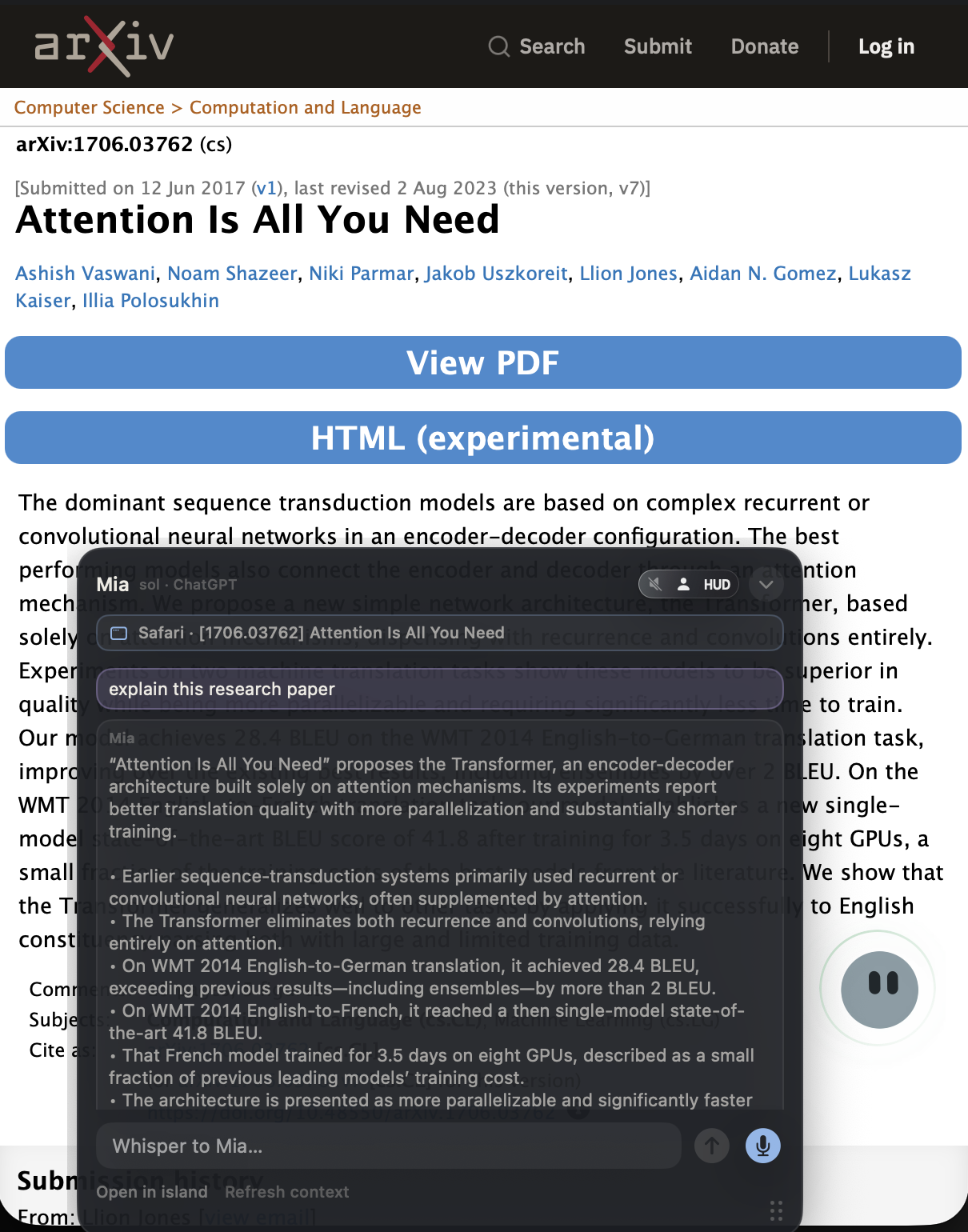
Ask about the webpage or app in front of you. Move the floating HUD over the window, then ask a question, get an explanation, or work through an idea. No copying into another chat.

Uses available window and page context. Content access depends on app support and permissions.

AN arXiv PAPER View the paper ↗
Actual Super Notch HUD and circular mascot over the arXiv page for Attention Is All You Need, answering a question about the paper
JUST ASK
"Explain this paper."
Actual HUD capture with the circular mascot, over the arXiv page.

00 / Your stack

Works where you already work.

Keep Claude, Cursor, Codex, and the rest. Super Notch finds the session and puts it on a card so you can get back in.

Cursor VS Code Claude Desktop Codex app Terminal
tmux cmux Claude Code Codex CLI Grok
OpenGrok Hermes Pi OpenCode

At a glance / Agent activity

See what is working.
Know when to look back.

Let your agents work in the background. Orbiting spheres in the notch keep their activity in sight, without switching apps just to check.

Animation preview
Not connected to your agents. Simulated activity and finishing turns. Reduced motion: static preview.
  1. 01 / Working

    A sphere for each working session.

    Larger spheres represent detected working sessions. Smaller spheres are ambient motion, not extra agents.

  2. 02 / Finishing

    The activity stops. The sphere pops.

    A brief burst marks a session no longer detected as working. A small signal to look back when you're ready.

Motion study / enlarged to show the transition. Not a live session.

Activity is inferred from supported sessions. A pop means a session is no longer detected as working, not that its result is verified; stale or disappearing sessions can also trigger it. Review the result in your agent's tool.

03 / Companion

A quiet face in the notch.

Optional HUD companion that tracks your cursor without taking over the desktop. Sora and Hana stay optional.

Companion previewDesign preview

Move your cursor. You've got company.

01 / A quieter palette

Chalk

04 / Same tools. Less friction.

Keep your workflow.
Shorten the way in.

"Where did I leave that conversation?" Find the project card. Resume the thread. Sessions / supported live and saved tools
"I can say this faster than I can type it." Put your words in the focused field. Type / Right Option
"I need help, not another window to manage." Talk from the notch. Keep your work open. Talk / Right Command
"I don't want to leave this window to ask." Open a floating conversation beside it. HUD / chat, voice, and window context
"This needs my coding agent." Send the brief to a session you can follow. Handoff / visible work in your own tools

05 / Studio

What shipped. What's next.

Release notes and the feature board. Ask for what you want next.

0.3.4 First Words Faster dictation starts. Keep the whole thought. Release notes
0.3.2 Drawer Sessions group by project. The island eases down. Release notes
Feature board Request a feature. Upvote the ones that matter. Open the board

Compare / Type

Dictation without another monthly bill.

Super Notch is not a monthly subscription. Type is on-device and $0/mo after the one-time license. Wispr Flow Pro is $15/user/mo.

Measure Wispr Flow Pro Super Notch
Billing model Monthly subscription One-time Mac license. Not a monthly subscription.
Dictation cost / mo $15/user/mo $0/mo after you buy
License Per-user Pro plan $20 first Mac, $10 each additional Mac

Contrast uses Wispr Flow Pro monthly pricing from wisprflow.ai/pricing. Wispr also lists annual billing. Super Notch Talk and Chat use your Grok or OpenAI plan; Type does not.

More comparisons: Wispr Flow alternatives · vs Superwhisper · vs NotchDeck.

Your notch. Put to work.

One-time license.
Not a subscription.

$20 for your first Mac. $10 for each additional Mac. Super Notch supercharges the stack you already pay for.

$20 first Mac.

$10 for each additional Mac. USD. Apple silicon · macOS 14+.
Version 0.3.13 · signed and notarized.
Best with your Grok or OpenAI subscription. Type dictation uses no model tokens.

Buy and activate.

Pay here. Get a license key and a notarized download. Paste the key in Super Notch to activate this Mac.

Checkout with Stripe

Does this replace Claude, Cursor, or Codex?

No. Keep the tools you already use. Super Notch tracks and continues sessions across them.

Is Super Notch a monthly subscription?

No. $20 for your first Mac, $10 for each extra. One-time.

Does Type dictation cost extra each month?

No. Type is on-device. After you buy, dictation is $0/mo. Talk and Chat use your Grok or OpenAI plan.

Can I ask about what's on screen?

Yes. Move the floating HUD over the window and ask. What it can see depends on the app and permissions.

Can I install it today?

Yes. Buy a license, download the notarized app, and paste your key to activate this Mac.

Is the floating HUD a separate AI app?

No. It is another surface for Super Notch's conversation, with the same brain by default. You can give the HUD its own provider/model settings, and you can hide it entirely if you prefer the notch.

Can I ask it to explain an arXiv paper?

Place the HUD over the paper's browser window and ask, "Explain this paper." The explanation depends on the text available to Super Notch. If only the title or abstract is accessible, that is not evidence that it has read the full PDF; it should explain that limitation rather than invent missing content.

What is a Mac notch AI session manager?

Super Notch is an AI agent session manager for Mac. It finds and resumes Claude Code, Codex, and Cursor sessions from the MacBook notch, with Talk from the notch and Type dictation into the focused field. It does not replace those coding tools.

Is Super Notch a MacBook notch AI assistant?

Super Notch is a MacBook notch AI assistant: Talk from the notch, Type into the focused field, session cards, and a floating HUD. It runs on Apple silicon Macs, including MacBook Pro, on macOS 14 or newer. Cursor, Claude Code, and the rest stay the tools that write. Super Notch sits beside the agent.

Is Super Notch a Mac notch AI companion?

Yes. Super Notch is a Mac notch AI companion. It lives in the notch and a floating HUD beside the agent you already run. Sessions, Talk, and Type sit next to Cursor, Claude Code, and Codex. Super Notch does not replace those tools.

Is Super Notch a MacBook Pro notch voice assistant?

Talk is the MacBook Pro notch voice assistant path. Hold Right Command, speak, and the answer uses Grok, OpenAI, or Apple Intelligence on a supported Mac. You need Apple silicon and macOS 14 or newer. Talk is the notch conversation, not a coding agent.

Can I dictate into Cursor or Claude Code?

Yes. Focus that tool's field, hold Right Option, and Type writes the words there. You review and send. Type is local speech-to-text and spends no model tokens. Talk (Right Command) is the notch conversation, not a replacement for those tools.

Dictate into Cursor on Mac. Dictate into Claude Code on Mac.

Does dictation use tokens?

No. Type (Right Option) is speech-to-text on your Mac. It pastes words into the field you focused. It does not call Grok or OpenAI, so it does not spend model tokens. Talk and Chat answers do use your chosen brain.

What does my Mac need?

An Apple silicon Mac running macOS 14 or newer. Voice features need microphone and accessibility permissions. For the best answers, sign Super Notch into Grok or OpenAI in Settings. Apple Intelligence can answer on supported Macs if you want to stay on-device.

Does it work on tasks invisibly?

Handoffs go to visible agent sessions. You can follow the work in the receiving tool. Type enters text into the field you focus; you review and send it.